If you want to blend cardio with productivity, a treadmill desk attachment can turn any walking session into a productive workday. This guide highlights five reliable options designed to hold laptops and tablets securely while you move. Each pick offers different sizes, mounting ranges, and ergonomics to suit various treadmill models and workstyles. Read on to compare features, compatibility, and practical considerations before choosing the best treadmill laptop attachment for your setup.
Summary Table
| Product | Brand | Handlebar Range (inches) | Weight Capacity | |
|---|---|---|---|---|
| INMAKER Treadmill Desk Attachment (Basic) | INMAKER | 1.2″ – 2.75″ round; 0″ – 2.75″ flat | Up to 10 lbs | Aluminum, folding tray, versatile for most laptops/tablets |
| Miden Treadmill Desk Attachment | Miden | Up to 33″ flat handrails | Up to 22 lbs | 36″ x 15.4″ desktop with edge guard |
| INMAKER Treadmill Desk Attachment (Black) | INMAKER | 1.2″ – 2.75″ round; 0″ – 2.75″ flat | Up to 10 lbs | Full metal structure; foldable tray |
| Qsxou Treadmill Desk Attachment (36 Inch) | Qsxou | 25″ – 32″ handrail distance | Up to 22 lbs | Large surface with cup/tablet holders and edge protector |
| Nexanic Treadmill Laptop Desk | nexanic | 25″ – 32″ handlebar distance | Unknown (built for general use; supports laptops/tablets) | Second-generation design with cup/tablet/phone holders |
INMAKER Treadmill Desk Attachment (Basic)

INMAKER’s basic treadmill desk attachment offers a compact, full-metal frame designed to maximize space. It supports laptops or tablets up to 10 lbs and features an adjustable height and angle to align with different working postures. The universal U-shaped clips fit round and flat handlebars, and a slim crossbar expands usable area between treadmill arms. The tray folds when not in use to avoid impeding running. This attachment suits users seeking a sturdy, economical option with straightforward setup.
Miden Treadmill Desk Attachment
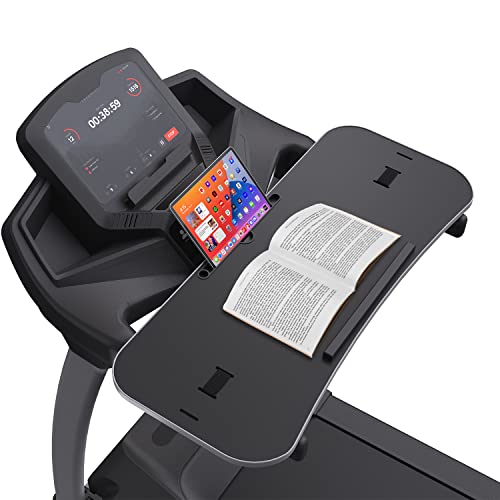
The Miden treadmill desk is designed for wider handlebars, up to 33 inches, and includes a protection strip plus a tablet slot. It emphasizes walk-while-work practicality with a robust 36″ x 15.4″ desk surface. The board supports up to 22 lbs and uses nylon straps and slots to secure the tray. Pros include a roomy work area and edge guards for device safety; potential concerns mention tray size for some treadmill models, so size awareness is recommended before purchasing.
INMAKER Treadmill Desk Attachment (Black)

This black variant mirrors the Basic INMAKER build with a full metal structure and a 10-lb weight limit. It emphasizes ergonomic height and angle adjustability to support prolonged online conferences, email tasks, or video viewing. The universal clamps fit common handlebar sizes, and the slim cross bar reduces wasted space between arms. A reliable choice for users prioritizing durability and simple fold-down operation.
Qsxou Treadmill Desk Attachment (36 Inches)

The Qsxou 36-inch desk offers ample space for laptops, tablets, and cups, with two cup holders and a tablet/phone holder. It fits treadmill handrails spaced 25″ to 32″ apart and supports up to 22 lbs. Edge protectors guard against scuffs, while a robust build prioritizes stability during movement. Reviewers note its large surface is a strong point for multitasking, though weight distribution should be considered for heavier devices.
Nexanic Treadmill Laptop Desk

The Nexanic treadmill desk presents a second-generation design with a cup holder and a tablet/phone holder for added versatility. It attaches to handlebars up to 35 inches, providing a large surface ideal for laptops and notepads. The platform enables hands-free multitasking, making it suitable for longer walking sessions that combine work and exercise. Be mindful of the overall footprint to ensure compatibility with your treadmill’s width and console access.
Buying Guide: Key Considerations And Comparisons
When choosing a treadmill laptop attachment, consider fit, stability, and ergonomics. A larger desk surface is helpful for multitasking, but ensure it does not obstruct treadmill controls or belt movement. Check handlebar compatibility, including diameter and spacing, to avoid interference with heart rate sensors or control panels. Weight capacity matters if you plan to place heavier devices or extra accessories like mouse pads or notebooks.
Mounting and adjustment features matter for long work sessions. Look for adjustable height and tilt to align your screen with eye level, reducing neck strain. A folding tray is advantageous for quick transitions from walking to running or resting. Edge guards and protective lips help keep devices safe from accidental bumps. Material quality—steel, aluminum, or wood—affects durability and noise during use.
Compatibility varies with treadmill makes and models. Some attachments shine in universal fit with adjustable clamps, while others are crafted for specific handlebar designs. If possible, measure your treadmill’s handlebar distance and diameter before purchasing. Consider whether you want a lightweight portable option or a more permanent, sturdy desk that can handle heavier loads or longer use sessions.
End-user feedback often highlights the trade-off between desk size and device fit. A notably large surface may clash with control panels or belt housing on compact treadmills. Conversely, compact trays save space but can feel cramped for multitasking. Evaluate your typical work setup (laptop size, external mouse, phone, cup) to pick a tray that comfortably accommodates your workflow.
Summary of practical choices:
- For compact spaces and lighter devices, INMAKER Basic offers a reliable aluminum frame with foldable design.
- For wider handlebars and larger work areas, Miden provides robust surfaces and a solid weight capacity.
- For heavier use or more industrial builds, Qsxou and Beendou-type options emphasize edge protection and security.
- For maximum multitasking with cups, tablets, and phones, Nexanic and similar models provide added accessory holders.